
Review and approve a version
Devices install only approved versions. You approve versions, not packages.
Before you begin
Section titled “Before you begin”- Permission: Manage packages (
packages:write) to approve or reject. Read packages to view.
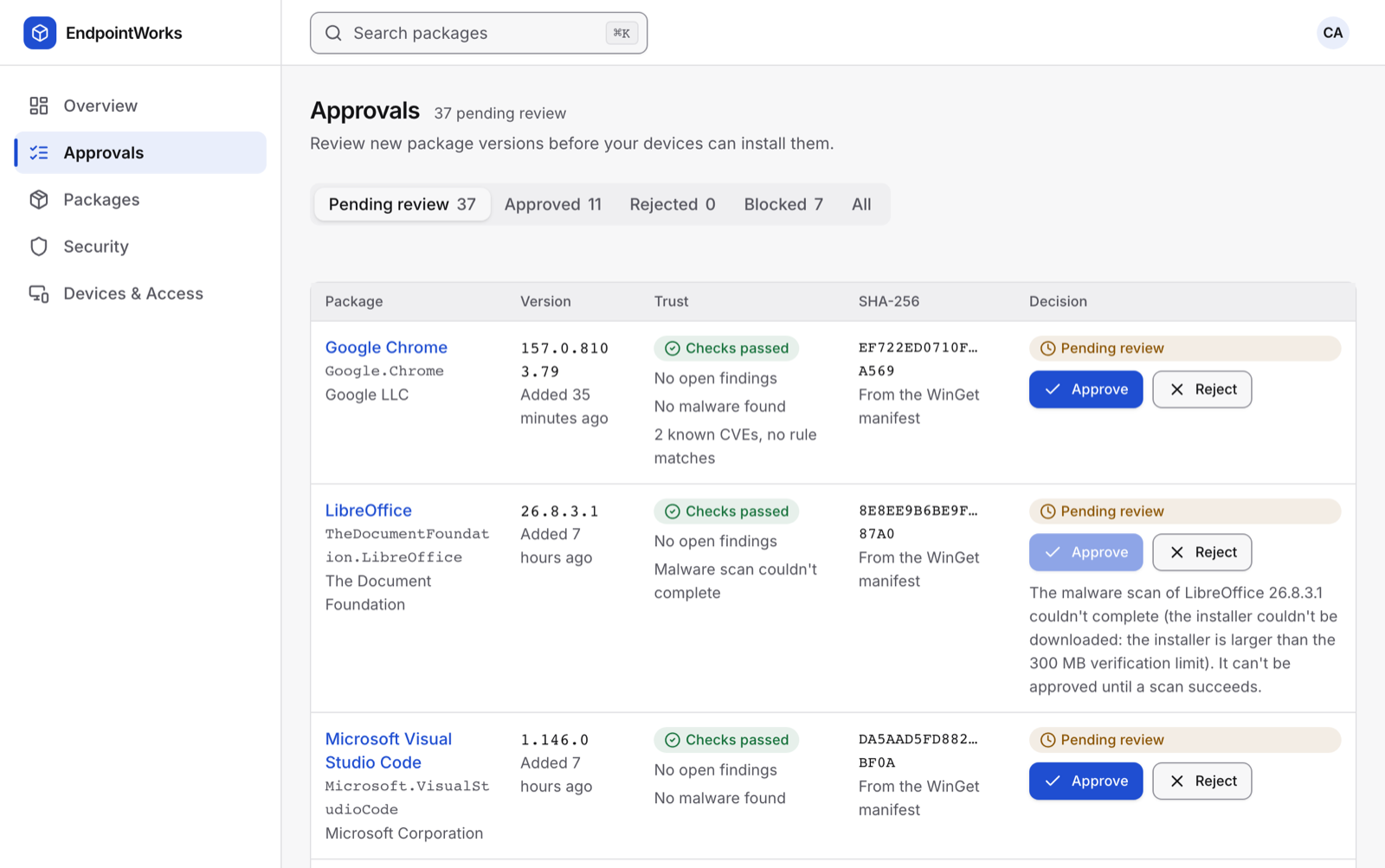
- Go to Approvals. The tabs are Pending review, Approved, Rejected, Blocked and All. with open findings narrows the list.
- Check the version’s row:
- Trust: the result of the checks, and whether malware was found.
- SHA-256: the installer hash, and where it came from.
- Open the package to see each check that ran.
- Choose Approve.
To refuse a version, choose Reject, enter a Reason, and choose Reject. The reason is required and goes in the audit log.
Result
Section titled “Result”Approved versions are served to your devices on their next request.
When Approve is disabled
Section titled “When Approve is disabled”The reason is shown next to the button. You can approve a version only when:
- its checks passed, or all its findings are below your policy’s Block approval at severity; and
- its malware scan finished. A scan that couldn’t complete blocks approval until a scan succeeds; and
- no vulnerability rule with Block publishing matches it.
Blocked versions
Section titled “Blocked versions”A version becomes Blocked when its scan failed, or when it has an open finding at or above your policy severity. A blocked version stops being served, even if it was approved.
If an approved version’s manifest or installer hash changes upstream, the approval is withdrawn and the version goes back to Pending review.
Troubleshooting
Section titled “Troubleshooting”| Problem | Fix |
|---|---|
| A version stays Scanning… | Large installers take longer. If it ends in Scan failed, choose Analyze again in Security › Findings. |
| The hash shows Could not verify | EndpointWorks couldn’t download the installer, or it is over the 300 MB verification limit. This doesn’t block approval on its own. winget still checks the hash on the device. |
| The hash shows Mismatch | The downloaded installer doesn’t match the manifest. A critical finding is added. Don’t approve it. |
| Many versions of one app | Each version is reviewed on its own. Set auto-approve to approve clean versions for you. |