
Private WinGet repository
Approve every version before it reaches a Windows device.
EndpointWorks gives your organization its own WinGet source. Pick packages from the WinGet community repository or upload your own installers. Review each version. Your devices install only what you approved.
- Works with the winget client already on Windows 10 and 11
- Every installer checked: SHA-256, Antivirus, CVE feeds
- Revoke a source key and those devices stop getting updates
How it works
Four steps from catalog to device
- 01
Build your catalog
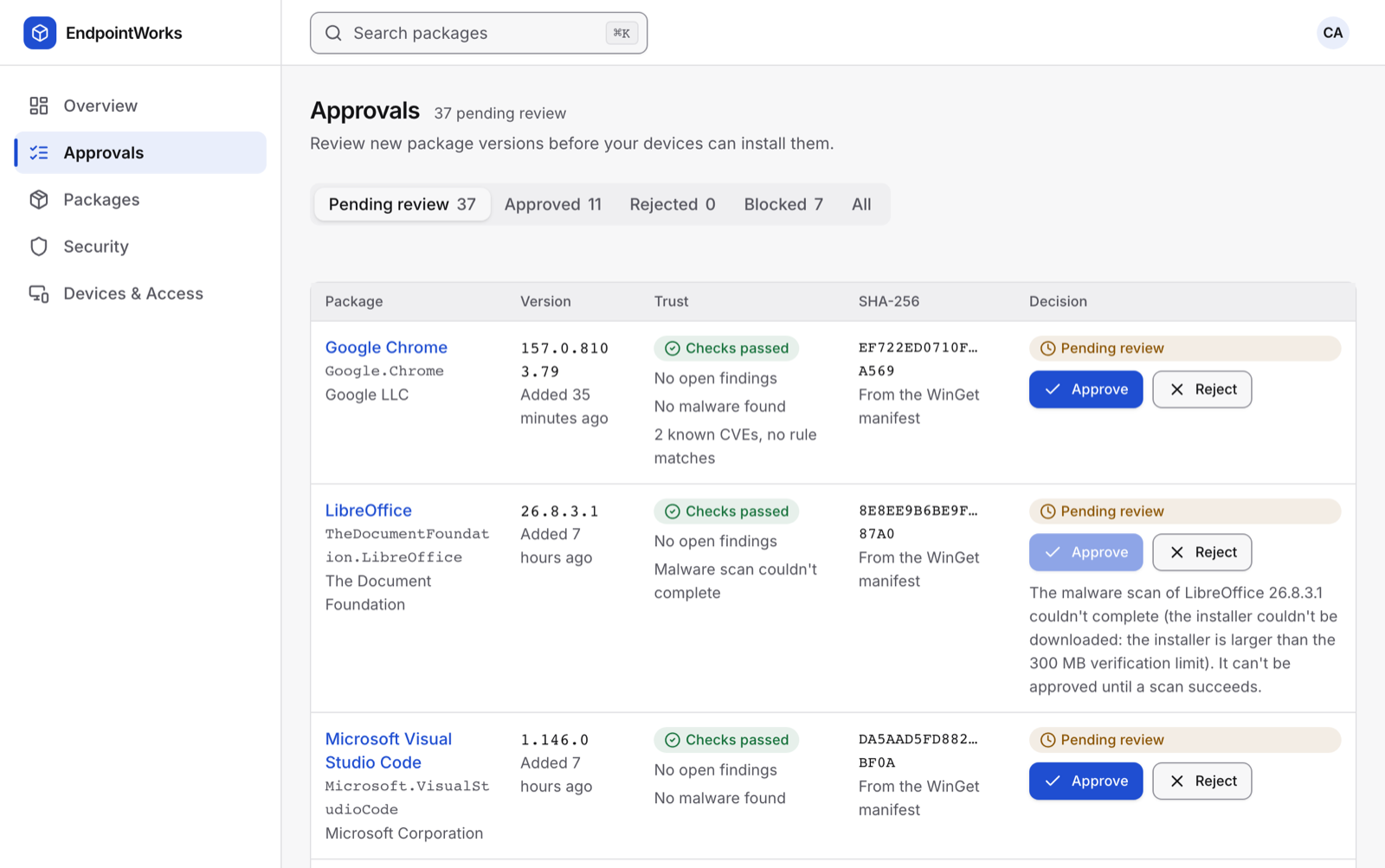
Add packages from the WinGet community source, or upload an installer. New versions arrive as Pending review.
- 02
Let the checks run
Manifest policy, installer SHA-256, an Antivirus scan, and matching against NVD, CISA KEV and your own rules.
- 03
Approve versions
Approve or reject each version, or auto-approve versions that pass. Findings at your policy's severity block approval.
- 04
Devices install
Devices use your source key to reach your source. They see approved versions only. Unknown keys see nothing.
On the device
It's the winget you already know
Create a source key in Devices & Access › Connect devices and copy the command it gives you. Run it once per device as an administrator, or deploy it with Intune or Group Policy.
Tested with winget 1.29 on Windows 11 24H2 and Windows Server 2025: source add, install, uninstall, a revoked key refused, and only approved versions served.
# Once per device, as administrator
> winget source add --name contoso `
    --arg https://api.endpointworks.com/api/winget/t/ews_9w8O… `
    --type Microsoft.Rest

# Then install from it like any other source
> winget install --id 7zip.7zip -s contoso
Found 7-Zip [7zip.7zip] Version 26.05
Successfully verified installer hash
Successfully installed
Who it's for
IT teams that manage Windows software
Endpoint and desktop admins
You want WinGet's catalog without letting every device install whatever is newest. EndpointWorks puts an approval step and a record between the community repository and your fleet.
Teams with in-house installers
Upload your own MSI or MSIX next to community packages. Devices install them with the same winget command, and only your organization can see them.
Security and governance
Set the severity that blocks approval, add CVE rules, and read the audit log. Every approval, rejection, upload, key and role change is recorded with who and when.
Organizations on Intune
Keep Intune for delivery and compliance. Use EndpointWorks to decide which versions are allowed, and download a ready-made Intune kit for the agent and each baseline (Premium).
Trust and security
Checks you can see, limits we state
Each version shows the checks that ran and what they found. "Checks passed" means those checks found nothing. It is not a promise that an installer is safe, and the console says so.
Installer
SHA-256 compared with the manifest. Antivirus scan and static analysis (signature present, packers). Known-bad hash lookup when configured.
Vulnerabilities
NVD, CISA KEV and FIRST EPSS, each on or off per organization. Rules decide what blocks and what is only highlighted.
Access
Sign-in through your identity provider, eight roles, scoped API tokens that expire, and a full audit log.
Isolation
Every query is scoped to your organization. A private package is never visible to another organization, even if it shares an identifier.
Integrations
Works with the tools you run today
| Tool | What EndpointWorks does with it | Plan |
|---|---|---|
| WinGet | Serves a WinGet REST source (Microsoft.Rest) per organization. Imports from the WinGet community repository. | All plans |
| Microsoft Intune | Win32 app settings for the agent, Remediations scripts, a custom compliance script, and one Win32 app per baseline. | Premium |
| ConfigMgr and Group Policy | Deployment settings for the agent MSI, ADMX templates for the server URL and enrollment token. | Business |
| Entra ID, Okta and other IdPs | Single sign-on with OpenID Connect or SAML 2.0, group-to-role mapping, SSO enforcement (Business) and SCIM provisioning (Enterprise). | Varies |
| Your own systems | A REST API with scoped tokens, and signed webhooks for install issues and SSO events. | All plans |
FAQ
Common questions
Do I need to install an agent?
No. Every plan works with the winget client that ships with Windows 10 and 11. You add your source once per device, and devices install only the versions you approved. The optional agent adds device inventory (Business plan and up) and managed installs (Premium).
Does EndpointWorks replace Intune?
No. It works alongside Intune. Intune can push the source command, the agent MSI and baseline apps. EndpointWorks decides which package versions are allowed. A package you mark as Intune-owned is never installed or removed by EndpointWorks.
Which installers can I upload?
MSI, MSIX, APPX, EXE and ZIP, up to 500 MiB each by default. EndpointWorks computes the SHA-256 while the file uploads, scans it, and serves it only to your organization.
Where do devices download installers from?
Community packages download from the vendor URL in the WinGet manifest, and winget checks the SHA-256 before it installs. Your private uploads download from EndpointWorks, through your source key.
What happens to installed software if we downgrade or stop paying?
Nothing is uninstalled. Paid features pause, devices keep what they have, and your source keeps serving approved versions on the Free plan.
Can we run it in our own cloud account?
Enterprise customers can ask for a dedicated deployment in AWS or Azure. Contact sales to talk through your network and isolation requirements.
More in the docs, or talk to sales.